
UI and UX are two distinct facets of web design, yet they work hand-in-hand. While UI focuses on your design interface and how a user interacts with it, UX emphasizes a user’s experience as they use your product or service.

UI design tools give designers what they need to design accurate hi-fi wireframes, mockups, and prototypes and render minimally viable products. They represent the nuts and bolts of a design, communicating its functionality.

UX design tools focus on the user and how they’ll experience the content. These tools can help structure the information architecture, as well as how someone will flow through the experience. Since this is more conceptual, UX tools are about helping a designer paint the broader picture of how content and organization will affect experience.

We’re going to take a look at some UI and UX tools that you may find handy for your design process. Some of these tools have features that work in both UX or UI, but for the sake of your own user experience, we’ve divided the list into two categories

17 useful tools for UI/UX designers

In this list, the first 11 tools mentioned are great for UI design, while 12-17 are great for UX. Let’s dive into each one and learn how you can craft beautiful projects.

1. Sketch

sketch interface

If you have any UI design experience, you’ve heard of Sketch. And there are quite a few reasons why it’s one of the design tools that’s so revered.

Being able to make universal changes — whether it’s through their library of symbols, layer styles, or text styles, or its smooth resizing and alignment features — saves designers time to deliver consistent prototypes. It takes out what’s tedious and lets designers jump in and create. And with a multitude of third-party plugins that integrate without problems, there’s no shortage of tools out there that can be used with Sketch.

Popular readFrom Sketch to Webflow: how to turn mockups into live websites

2. InVision Studio
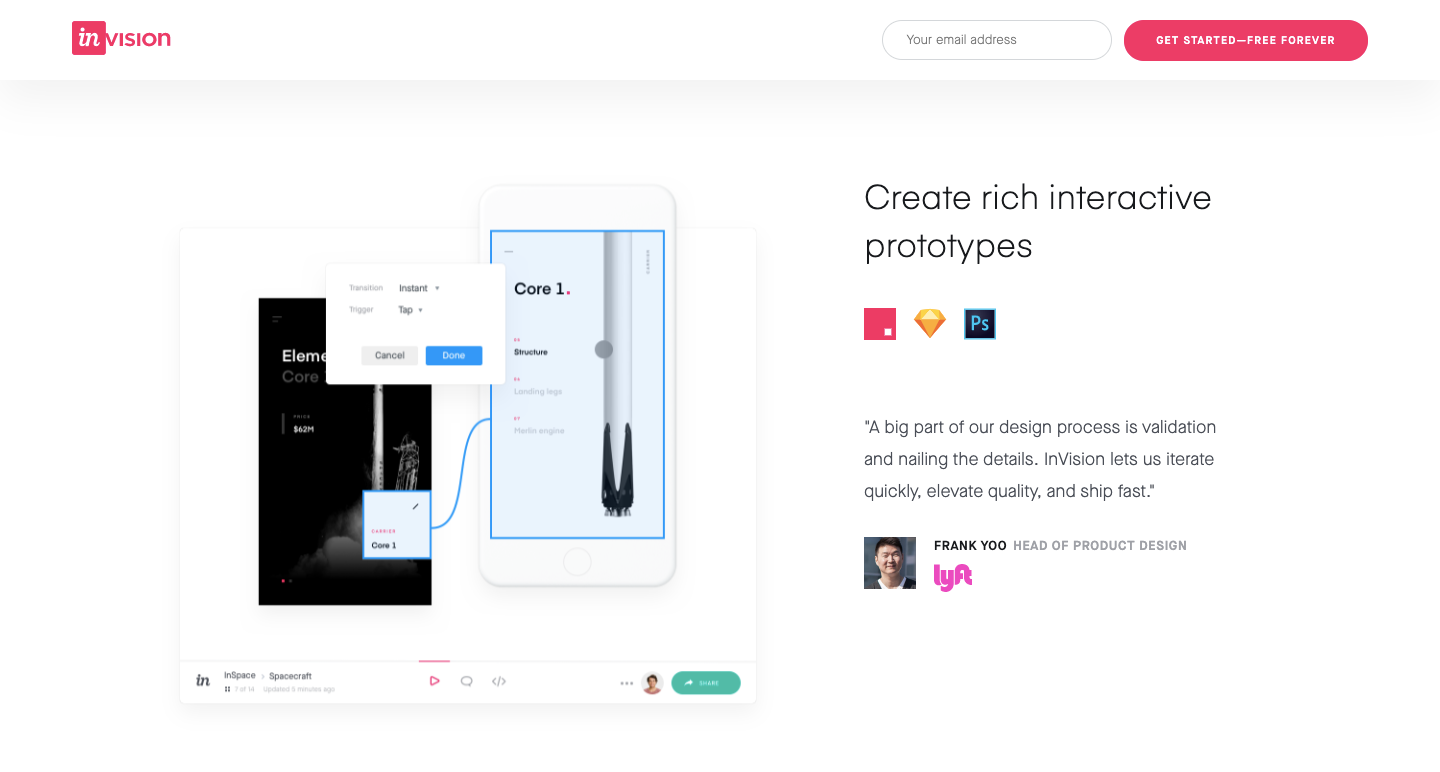
invision studio

With a full suite of applications, InVision gives designers all of the UI design tools they need to create fully realized and functional prototypes with dynamic elements and animations.

Along with these easy-to-use UI design tools, they also make communication easy — with collaboration features that let developers share their work as they design it, receive feedback, and make documented changes at each step. Another useful aspect of InVision is the digital whiteboard that allows team members to get their ideas out there, interact, and get that all important sign-off before moving forward.

3. Axure

Axure homepage

Axure functions in prototyping and keeping track of the workflow. It features a smooth interface to document as you go. High fidelity drives this app, resulting in prototypes full of details.

Axure offers many of the other features of popular prototyping and UI design tools. It allows for testing of functionality and puts everything together for an easy developer handoff. This, combined with an emphasis on communication, ensures that everyone on a project is kept up-to-date with progress and changes as they happen in real time, making Axure a solid choice for UI design.

4. Craft
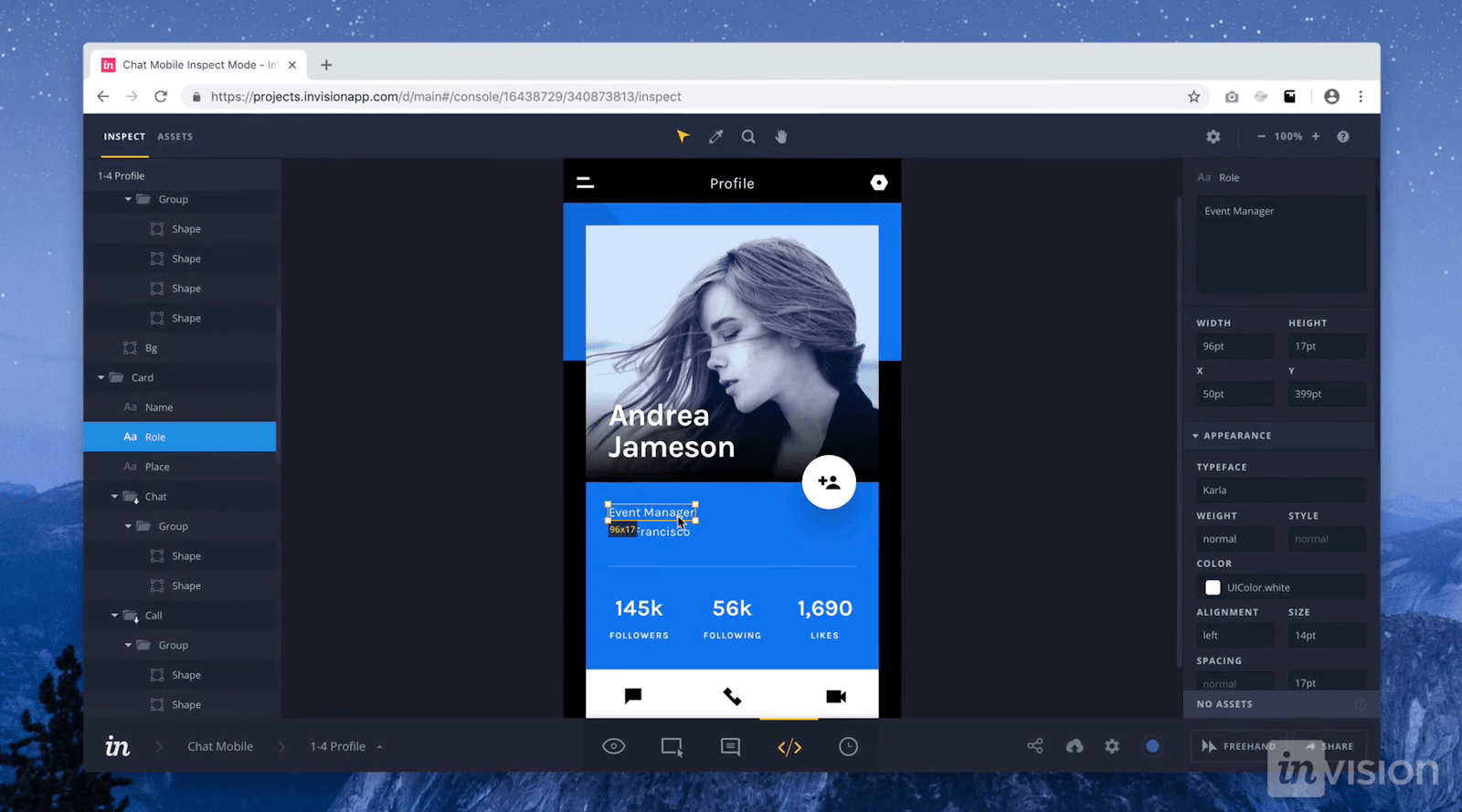
invision craft

Craft, a plugin from InVision, works right alongside what you might be doing in Photoshop or Sketch, with a sync function that updates what you’re working on. Along with this time-saving feature, Craft offers everything you need for prototyping and collaboration. Changes in styling, edits, and other tweaks are updated across the board so that everyone is referring to and working from the same version of a project.

Craft sets itself apart from other UI design tools with its placeholder content. You get access to both Getty and iStock photos, letting you fill your layout with better visuals. And if there’s data in your layout, you can use your own or bring it in from other sources. Not many UI design tools let you fill your mockups with more meaningful content. This special feature of Craft gives your mockups a more accurate representation of what a final design might look like.

Related reads: The best Photoshop alternatives (free + paid)

5. Proto.io

proto io

In their own words, Proto.io says using their UI design software results in “Prototypes that feel real.” And Proto.io delivers on this, giving you what you need to create, organize, integrate, and test accurate mockups. It also smooths out the collaboration process, fostering communication between team members through comments and video feedback, as well as integrating with some of the more well-known testing products, like Lookback, Userlytics, and Validately.

6. Adobe XD
adobe xd

It’s hard to knock Adobe off of their status as royalty in design software — their kingdom of design products reigns in the creative cloud. Adobe XD offers vector-based user interface tools for creating prototypes and mockups with an interface that’s familiar to anyone who has used other Adobe products. This, along with real-time collaboration, makes it a go-to for many UI designers.

Adobe XD has many sophisticated tools for UI designers, but it is also stocked with what designers need to whip up interactions and other dynamic elements that can be integrated into prototypes or mockups. It’s one of the rare design platforms that can combine different disciplines together, without anything lacking.

Popular readFrom Adobe XD to Webflow: how to turn your prototypes into live websites

7. Marvel

marvel design platform

Whether you’ve been a UI designer for a while or if you’re just stepping into the role, Marvel’s design platform makes things easy. With the ability to create both low fidelity and hi-fi wireframes, interactive prototypes, and do user testing, it gives a UI designer everything they need — all wrapped into an intuitive interface. Marvel also has a feature called Handoff that gives developers all the HTML code and CSS styles they need to start building.

8. Figma

figma design tool

Figma lets designers build dynamic prototypes and mockups, test them for usability, and sync up all of the progress. Figma allows for a collaborative environment where multiple people can
Read the rest
Read More

As a software engineer, I spend a lot of time reading and writing design documents. After having gone through hundreds of these docs, I’ve seen firsthand a strong correlation between good design docs and the ultimate success of the project.

This article is my attempt at describing what makes a design document great.

The article is split into 4 sections:

  • Why write a design document
  • What to include in a design document
  • How to write it
  • The process around it

Why write a design document?

A design doc — also known as a technical spec — is a description of how you plan to solve a problem.

There are lots of writings already on why it’s important to write a design doc before diving into coding. So all I’ll say here is:

A design doc is the most useful tool for making sure the right work gets done.

The main goal of a design doc is to make you more effective by forcing you to think through the design and gather feedback from others. People often think the point of a design doc is to teach others about some system or serve as documentation later on. While those can be beneficial side effects, they are not the goal in and of themselves.

As a general rule of thumb, if you are working on a project that might take 1 engineer-month or more, you should write a design doc. But don’t stop there — a lot of smaller projects could benefit from a mini design doc too.

Great! If you are still reading, you believe in the importance of design docs. However, different engineering teams, and even engineers within the same team, often write design docs very differently. So let’s talk about the content, style, and process of a good design doc.

Photo by Todd Quackenbush on Unsplash

What to include in a design doc?

A design doc describes the solution to a problem. Since the nature of each problem is different, naturally you’d want to structure your design doc differently.

To start, the following is a list of sections that you should at least consider including in your next design doc:

Title and People

The title of your design doc, the author(s) (should be the same as the list of people planning to work on this project), the reviewer(s) of the doc (we’ll talk more about that in the Process section below), and the date this document was last updated.

Overview

A high-level summary that every engineer at the company should understand and use to decide if it’s useful for them to read the rest of the doc. It should be 3 paragraphs max.

Context

A description of the problem at hand, why this project is necessary, what people need to know to assess this project, and how it fits into the technical strategy, product strategy, or the team’s quarterly goals.

Goals and Non-Goals

The Goals section should:

  • describe the user-driven impact of your project — where your user might be another engineering team or even another technical system
  • specify how to measure success using metrics — bonus points if you can link to a dashboard that tracks those metrics

Non-Goals are equally important to describe which problems you won’t be fixing so everyone is on the same page.

Milestones

A list of measurable checkpoints, so your PM and your manager’s manager can skim it and know roughly when different parts of the project will be done. I encourage you to break the project down into major user-facing milestones if the project is more than 1 month long.

Use calendar dates so you take into account unrelated delays, vacations, meetings, and so on. It should look something like this:

Start Date: June 7, 2018
Milestone 1 — New system MVP running in dark-mode: June 28, 2018
Milestone 2 - Retire old system: July 4th, 2018
End Date: Add feature X, Y, Z to new system: July 14th, 2018

Add an [Update] subsection here if the ETA of some of these milestone changes, so the stakeholders can easily see the most up-to-date estimates.

Existing Solution

In addition to describing the current implementation, you should also walk through a high-level example flow to illustrate how users interact with this system and/or how data flow through it.

user story is a great way to frame this. Keep in mind that your system might have different types of users with different use cases.

Proposed Solution

Some people call this the Technical Architecture section. Again, try to walk through a user story to concretize this. Feel free to include many sub-sections and diagrams.

Provide a big picture first, then fill in lots of details. Aim for a world where you can write this, then take a vacation on some deserted island, and another engineer on the team can just read it and implement the solution as you described.

Alternative Solutions

What else did you consider when coming up with the solution above? What are the pros and cons of the alternatives? Have you considered buying a 3rd-party solution — or using an open source one — that solves this problem as opposed to building your own?

Testability, Monitoring, and Alerting

I like including this section because people often treat this as an afterthought or skip it altogether, and it almost always comes back to bite them later when things break and they have no idea how or why.

Cross-Team Impact

How will this increase the on-call and dev-ops burden?
How much money will it cost?
Does it cause any latency regression to the system?
Does it expose any security vulnerabilities?
What are some negative consequences and side effects?
How might the support team communicate this to the customers?

Open Questions

Any open issues that you aren’t sure about, contentious decisions that you’d like readers to weigh in on, suggested future work, and so on. A tongue-in-cheek name for this section is the “known unknowns”.

Detailed Scoping and Timeline

This section is mostly … Read the rest

Read More

Nowadays, technology is advanced and upgraded. For that packaging system has been changed a lot. Due to advanced packaging technologies, modern methods can decrease the amount of waste. The modern techniques focus on the maximum resources and concentrate on waste management. In this way, modern packaging can also save a lot of money. Awareness of the customer is also playing a valuable role in the emergence of the modern packaging system. The modern method of packaging is very much sustainable. These packagings use eco-friendly materials.

Packaging and its relevance:

The packaging is very much essential to protect products that are distributed in the market for sell. There are so many varieties of packaging such as boxes, cans, bottles, bags, envelopes and wrappers as well. Above all, the packaging is one of the main factors for selling. Many companies choose different types of packaging to sell their products through better packaging and designing. We all know that attractive packaging not only grabs the attention of the customers but also ensure the protection of the item and its longevity as well.

So, the modern methods of packaging are very much valuable and it also allows to prevent wastage. The modern packaging system can prevent foods from spoiling and getting damaged before reaching its final destination. So, increased method of packaging can save a lot of money and time as well. It also protects the products and foods.

Some modern and advanced packaging technologies:

Here are some modern packaging systems that can save a lot of money and also eco-friendly. These advanced systems are such as follows:

Refill system:

It is one of the modern forms of packaging. It reduces waste and follows waste management as well. In this system, the manufacturer reuses the packaging materials. So, it allows for less waste production. The wastage is being dumped into the land after production. This particular form of packaging is very much popular and well-known in Germany and other countries. In these countries, beer, milk and detergent are being refilled into the old packaging system. This type of packaging is environment-friendly and cost-effective as well. It offers so many environmental benefits. Nowadays, many companies produce refilled water bottles instead of small water bottles. Many people argue that refilled items are expensive. But if you are looking at the advantages then, you can notice that refillable items are considered as more favoured and beneficial as well.

Flat packaging:

It is another beneficial packaging systems to cut down the wastage. Apart from this, it also reduces the larger and bigger packaging materials. It is also a new concept of packaging. This packaging system is introduced commercially by IKEA. This packaging uses the form or method of packaging that are fabricated in the flat portions. This packaging system can be designed quickly and assembled easily as well. The main advantage of this packaging system is its flatness. This type of packaging is space-efficient and also needs less material. So, it requires less money to produce this particular type of packaging. The storage and shipping charges are comparatively low in this packaging system. For furniture packaging, this package system works better. It is also useful for packaging wares, gadgets, toys and all.

Bulk packaging:

This particular packaging system is also one of the best packaging systems to reduce waste. In this packaging system, the manufacturers do not use small, fancy and also unnecessary items and materials. Apart from this, the bulk package system offers and allows materials to be used on other occasions. Therefore, it is one fo the reasonable methods of packaging.

In the bulk packaging, there are two different packaging methods such as flexible and rigid packaging. Flexible packaging can offer so many flexibilities and benefits than rigid packaging.

Active packaging:

This type of packaging can enhance the lifetime of the product. It also protects the products from damage. The active packaging helps to keep the food intact and extending the shelf-life of the product. The active packaging systems are such as follows:

  • Oxygen scavenger
  • Carbon dioxide scavenger
  • Ethylene scavenger
  • Preservative releasers
  • Moisture absorbers
  • Odour absorbers

Intelligent packaging:

Intelligent packaging is for protecting the food items. It also controls the quality of packed foods. This type of packaging follows these things:

  • Time and temperature indicator
  • Indicator of freshness
  • Pathogen indicators

These all are different advanced packaging technologies. Apart from this, modern packaging offers a simplified design. The biggest shift is to transform into simplified and minimal design. In the simplified designs, the packaging needs bold colours and clean labelling as well. The using of bold colours are very much popular and common in children’s items. Using the same colour pallets also help to identify different products of the same brand. It also helps to make the brand attractive and noticeable.

Cleaners labelling is one of the necessary and convenient matters of advanced packaging. It makes consumers more aware of what they are buying. Clean labelling is used for brand transparency. The user will appreciate this a lot. The clean labelling elaborates on what the product offers.

The modern packaging follows less packaging as the excess packaging can be quite frustrating and it creates a lot of waste. For example, the box of a toothpaste tube has no purpose. It comes to give a better look at the product.

Many companies now switch over recycled paper packaging. It has much less carbon footprint. Many companies and brands use the refill packages instead of bottles and containers. These types of refill packages or pouches contain less plastic than bottles. These pouches also take less space. The packaging is a part of the product and its marketing. For safe storage, proper packaging is important and needed. The reusable packaging system enhances and ensures the safety of the product. Pharmaceutical and food products use smart and advanced packaging method. The smart and advanced packaging system follows the low cost. It is also a smart way to cut down the material cost and manage wastages. These types of advanced packagings … Read the rest

Read More